How to Recover Deleted JPG Images from Canon Powershot?
Have You Experienced the Following Problems with Your Canon Powershot?

How to solve the photo or files loss on your Mac? Actuall, to resolve the problems above, there is a tool named uFlysoft Data Recovery for Mac, which is made to recover all kinds of image files that the Canon Powershot supports. It can recover JPEG, PNG, GIF, TIFF and other files as well as the RAW files that have the.CRW or .CR2 extensions. uFlysoft Data Recovery for Mac performs both a great photo recovery and data recovery for Mac OS X 10.9, 10.8 and lower OS.
Why Files Can Be Recovered
The details of how this occurs depend on the operating system (OS) the computer is running, but the basics tend to be similar. A computer disk stores information in a series of chunks known as sectors, each is typically 512 bytes long. Each sector has a number that serves as its address on the disk. A file on the disk is split across a number of sectors. These sectors may be located together but might be scattered across the disk if there is not enough contiguous space in one spot. The OS has an index mechanism to keep track of which sectors belong to which file–the particular mechanism varies by OS. But they all do it. Additionally, because sectors are addressed by numbers and people care more about names than numbers, the OS also stores a directory that maps the file name for the index entry about which sectors contain the file’s information.
As an analogy, consider the disk to be a filing cabinet that contains a long series of consecutively numbered folders. Each of which can contain only a few pages of information. A particular document might be split among many folders if it is too big to fit on just one. The first drawer of the cabinet holds a big directory that has a list of all the documents in the cabinet. The folder number associated with a particular document holds an index to all the other folders that contain the parts of the document.
When a file is deleted, the information stored in the individual sectors is not erased, because the erasure process consists of overwriting the sector and is relatively slow. It is significantly faster to overwrite the sector by rewriting it with new data only when it is needed for some other file. So when a user “deletes” a file, the directory entry for the file is either removed or marked as deleted by changing the first letter of the file name with a special character (which again differs depending on the OS). The index entry and the sectors are then made available as space for new files but are left untouched until needed.
So this makes data recovery possible. (The same principle is also fit for the Windows PC and if you are using Windows PC, uFlysoft also can help you-uFlysoft offers Photo Recovery for Win to recover lost photos, video and audio files on Windows PC easily.)
How to Recover Deleted JPEG Images from Canon Powershot?
It's easy to get back your lost JPG and other images with uFlysoft JPG Photo Recovery. You only need a few steps to finish the recovery of JPG images from Canon Powershot.
Step 1. Launch uFlysoft Data Recovery and insert the sd card of your Canon Powershot into Mac;
Step 2. Simply click card drive and then the "Scan" button;
Step 3. Once the scan process is finished, you are able to view the lost JPG or other photos;
Step 4. Click each photo to preview whether you need to recover it or not;
Step 5. Click the JPG photos which you want to recover and press "Recover" button;
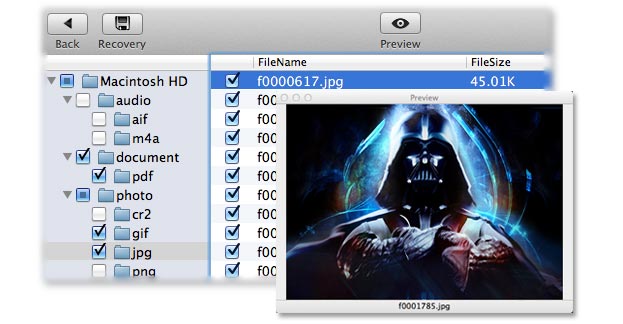
Note: Do Not capture more photos using the Canon Powershot memory card from which you need to recover lost / deleted JPEG image files in case the data is rewritten. Or you may check uFlysoft studio to know more about skills of recovering data easily.



Hot Products
Hot Topics
- How to Get Back Lost Word Document
- Bring Back Your Lost Files after Emptying Trash
- Restore Your Mac Lost or Deleted Files
- Get the Mac Lost Partition Files Back
- Recover Data from Your USB Drive
- Recover Deleted Data from iPod (Mini, Nano, Classic)
- How to Recover Memory Card in Mac OS
- How to Recover Deleted Photos and Music
- Recover Contacts, SMS, Photo and Video Files from iPhone/iPad
- Recover Deleted Data on Apple Computers